

Introduction
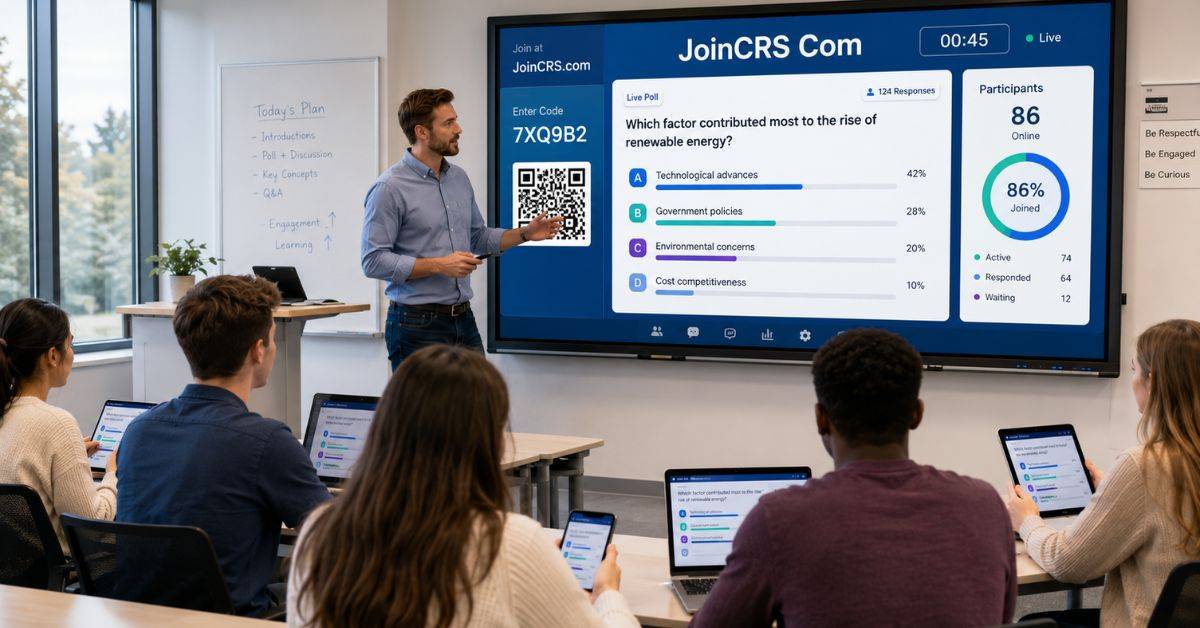
When technology enhances the curriculum rather than disrupts it, digital learning is most successful. JoinCRS Com gives students a quick way to answer teacher-led polls through Classroomscreen. Learners can open the page, enter a class code, and respond from a phone, tablet, Chromebook, or computer without creating another account.
JoinCRS Com supports knowledge checks, class opinions, confidence ratings, and exit questions. However, it is not a complete learning management system, homework portal, or video-meeting platform. Its main purpose is to connect students with a live poll while the teacher controls the activity from ClassroomScreen.
What Is JoinCRS Com?
JoinCRS Com is the student joining page for Classroomscreen’s remote poll feature. The teacher creates a question and displays a code or QR code. Students use it to open the poll and submit an answer. The platform is designed for short classroom activities. It does not store courses, manage grades, or replace systems such as Google Classroom or Moodle. Its main strength is speed because most learners can enter a session within seconds.
How Students Join a Poll
Using JoinCRS Com involves a few clear steps:
- The teacher opens ClassroomScreen and adds the Poll widget.
- Remote voting is switched on.
- A code or QR code appears on the classroom screen.
- Students open the joining page on their devices.
- They enter the code, choose an answer, and submit it.
Students should only use the code shared by their teacher. A code found elsewhere may be expired or connected to another class.
Main Classroom Features
JoinCRS Com connects learners to the polling part of a wider classroom toolkit.
Useful features include
- Multiple-choice, true-or-false, and smiley answers.
- Live charts showing class responses.
- QR code access for faster joining.
- Timers and stopwatches for activities.
- Work symbols and traffic lights for clear instructions.
- Random name and group-making tools.
These tools help students understand what to do and how much time they have.
Why Teachers Use It
Teachers use JoinCRS Com to receive fast feedback during a lesson. Students’ comprehension of a subject can be ascertained with a brief question.
Common uses are
- Reviewing the previous lesson.
- Predicting an experiment’s result.
- Checking confidence before a test.
- Collecting opinions before a discussion.
- Asking an exit question.
For example, a mathematics teacher can display four possible answers. If many learners select the same incorrect option, the teacher can revisit and explain that step again.
Benefits for Students and Teachers
JoinCRS Com can encourage wider participation because learners can answer without speaking in front of the class.
| Area | Benefit for students | Benefit for teachers |
| Access | No long sign-up process | Fewer login problems |
| Participation | More learners can respond | The class answers together |
| Feedback | Students check understanding | Lessons can change quickly |
| Devices | Works in a browser | Supports common devices |
| Lesson flow | Instructions stay clear | Polls fit existing lessons |
Poll answers should not be treated as a complete measure of ability. Teachers should also use classwork, discussion, projects, and observation.
Practical Classroom Ideas

JoinCRS Com works best when each question is short and has a clear purpose.
Teachers can
- Start class with one review question.
- Ask students to predict what happens next.
- Use smileys to assess confidence.
- Collect opinions before a debate.
- End the lesson with one key question.
The tool can also support hybrid classes. Students at home and school can answer the same poll if they have the code and a stable connection.
Privacy and Safe Use
JoinCRS Com should be used with the same care as every online education service. Teachers should share codes only with the correct class and close the poll when it ends.
Safe habits include
- Never request passwords, addresses, or medical details.
- Use school-approved devices and networks.
- Follow local student-data rules.
- Review the official privacy policy.
- Offer another way to answer when a student cannot connect.
ClassroomScreen states that it does not sell personal information or place advertisements in its application. Normal technical data, including browser type, IP address, and visit time, may still be processed.
Common Problems and Solutions
The majority of JoinCRS Com issues are simple to resolve. An invalid code may have been typed incorrectly, while a blank poll may mean remote voting is closed. When a QR code fails, students can enter the code manually. A slow page often points to weak Wi-Fi, and an answer that will not send may mean the session has ended. Teachers should test the poll on another device before class. A paper question or show-of-hands activity is also a useful backup.
Comparison With Other Learning Tools
JoinCRS Com focuses on quick classroom responses, while other platforms may provide games, assignments, grades, or video communication.
| Tool type | Main purpose | Account needed? | Best use |
| Classroom joining page | Live polls | Usually no | Fast checks |
| Game-based quiz tool | Competitive quizzes | Sometimes | Review games |
| Learning management system | Courses and homework | Usually yes | Grades and files |
| Video-meeting platform | Online communication | Depends | Remote classes |
The joining page works best as an extra classroom tool rather than a replacement for every education platform.
Important 2026 Improvements
In 2026, Classroomscreen improved its dashboard and lesson organization. Screen decks and folders help teachers arrange and reuse displays. Favourite decks can be pinned, while custom colours and uploaded timetable images provide more design control. These changes do not greatly affect how students enter polls, but they can speed up lesson preparation and help teachers organise screens by class, subject, or week.
FAQs
Is JoinCRS Com free for students?
Students can normally enter an active teacher poll without paying or creating a personal account.
Can it work on a phone?
Yes. It works through a supported browser on phones, tablets, Chromebooks, laptops, and desktop computers.
Is it a full online classroom?
No. It mainly provides access to live ClassroomScreen polls.
Please clarify why the class code is not functioning.
The code may be incorrect, expired, or inactive because remote voting is closed.
Can poll answers become final grades?
They may support assessment, but one poll should not be the only evidence of learning.
Conclusion
JoinCRS Com provides a direct way for students to take part in live classroom polls. Code-based access reduces sign-up problems, gives more learners a chance to answer, and helps teachers understand class progress quickly. It can support reviews, predictions, confidence checks, discussions, and exit tickets. The tool is most useful when questions are clear and connected to the lesson. It still requires internet access and does not replace a grading system, homework platform, or video classroom. Teachers can begin by preparing one short poll, testing it on another device, and keeping an offline activity ready. Used carefully, this classroom response platform can make lessons more active, organized, and flexible in 2026.